


Whoever builds the schedule at a restaurant knows the job is bigger than it looks. It takes real time every week, and it gets judged twice. When the team is stretched thin on a Friday night, everyone looks at the scheduler. When labor comes in high at the end of the month, everyone looks at the scheduler again.
Then there is everything a schedule can't see coming. Someone calls out an hour before their shift. A Tuesday that is usually quiet turns into a rush. A plan that looked right on paper is falling apart by 7 PM.
Most schedules start as a copy of the week prior, adjusted for who asked for which day off. That is fast, and it repeats whatever went wrong last week. Scheduling from data instead of gut feel is what keeps labor tight, and tight labor is what protects profit. This guide shows how to build the schedule from the sales you expect, in seven steps, with two numbers to check the plan before you post it. It works with whatever you schedule in today: scheduling software, a spreadsheet, or a sheet of paper on the office wall.
A schedule built around sales starts with when the sales come in, and that is different for every concept. A coffee shop does most of its business before lunch: a morning peak, a steadier midday and a quiet afternoon. A full-service dinner house is close to the opposite. Lunch can be slow, and Friday and Saturday evenings carry the week.
That is why this guide works by daypart, the blocks of the day you already think in, such as open, lunch, dinner and close. Yours may be cut differently, and that is fine. What matters is that you plan each daypart on its own instead of planning the day as one block.

Restaurant labor cost percentage is labor cost divided by sales for the same period. It tells you how much of every sales dollar went to labor. Count labor the same way every week. Some operators count only hourly wages, and others add salaried managers, payroll taxes, and benefits. Either works, as long as you stay consistent.
Sales per labor hour is sales divided by the hours your team worked. Labor cost percentage tells you what the hours cost. Sales per labor hour tells you how much business each hour supported, and it doesn't move when wages change, which makes it the better number for planning hours.
Look at both by daypart, not only for the whole day, because a daily average hides a lot. You can have a killer dinner, with every hour on the floor earning its keep, and still miss your goal for the day because 2 to 5 PM pulled the average down. The daily number won't show you that. The daypart view will.
This guide won't give you a target for either number. The right target depends on your concept, your menu, your prices, and your market. The best place to find yours is your own history: the weeks when service went well, and labor came in where you wanted it.
Look at the same weekday across the last four to six weeks: every Tuesday, every Friday and so on, split by daypart. Most POS systems can report sales by hour, which you can group into your dayparts. One week can be a fluke. Four to six weeks show the pattern.
Without the history, you are scheduling from memory. Memory holds on to the busiest night of the month, not the average one.
History tells you what a normal week looks like, and this week may not be normal. Check the calendar for a holiday, a local event, a large party on the books, a promotion or a menu change, and check the weather. Move each daypart's expected sales up or down for what you know.
This is the step that saves you on the night of the big game or the surprise 20-top.
This is the step most schedules skip, and it is the one that makes the rest work. For each daypart, divide expected sales by your sales per labor hour target. The answer is the number of labor hours that daypart can support. If you expect $3,000 in sales at dinner and your target is $75 in sales per labor hour, dinner can support 40 labor hours.
Then check that number against the minimum it takes to open the doors. Some positions have to be filled however slow it gets: someone on the line, someone at the register or the host stand, someone who can close. If the hours from your sales come out below that minimum, the minimum wins, and you know going in that this daypart will run at a higher labor cost percentage.
Now turn hours into shifts and people. Put your strongest people on your busiest hours. Stagger start times so people arrive as the rush builds, instead of everyone clocking in at once. Keep a running total of each person's hours for the week as you go, so no one slides into overtime by Saturday.
The right total hours can still put the wrong people on the floor at the wrong time.
Add up the scheduled hours and what those hours will cost, then compare them with the week's expected sales. That gives you a planned labor cost percentage and a planned sales per labor hour, by daypart and for the week. If a daypart is far from where you want it, fix it now. Moving a start time on paper is a lot easier than cutting someone mid-shift.
Skip it, and the first time you see the labor number is after the week is over.
Post the schedule as early as you can. Your team has lives outside the restaurant, and the sooner they see their shifts, the sooner they can plan around them and flag a conflict while there is still time to fix it.
When the week is over, compare it with the plan, daypart by daypart. Were sales where you expected? Were hours? Work out the actual labor cost percentage and sales per labor hour, and put them next to the planned ones from step 5. That is how you know whether the schedule worked. Which dayparts came in over, and why: a forecast that was off, a shift that ran long, a cut that didn't happen? Write down what you would change, and use that note when you build next week's schedule. Each week's note makes the next forecast a little better.
This is the step that makes every schedule after it a little better.
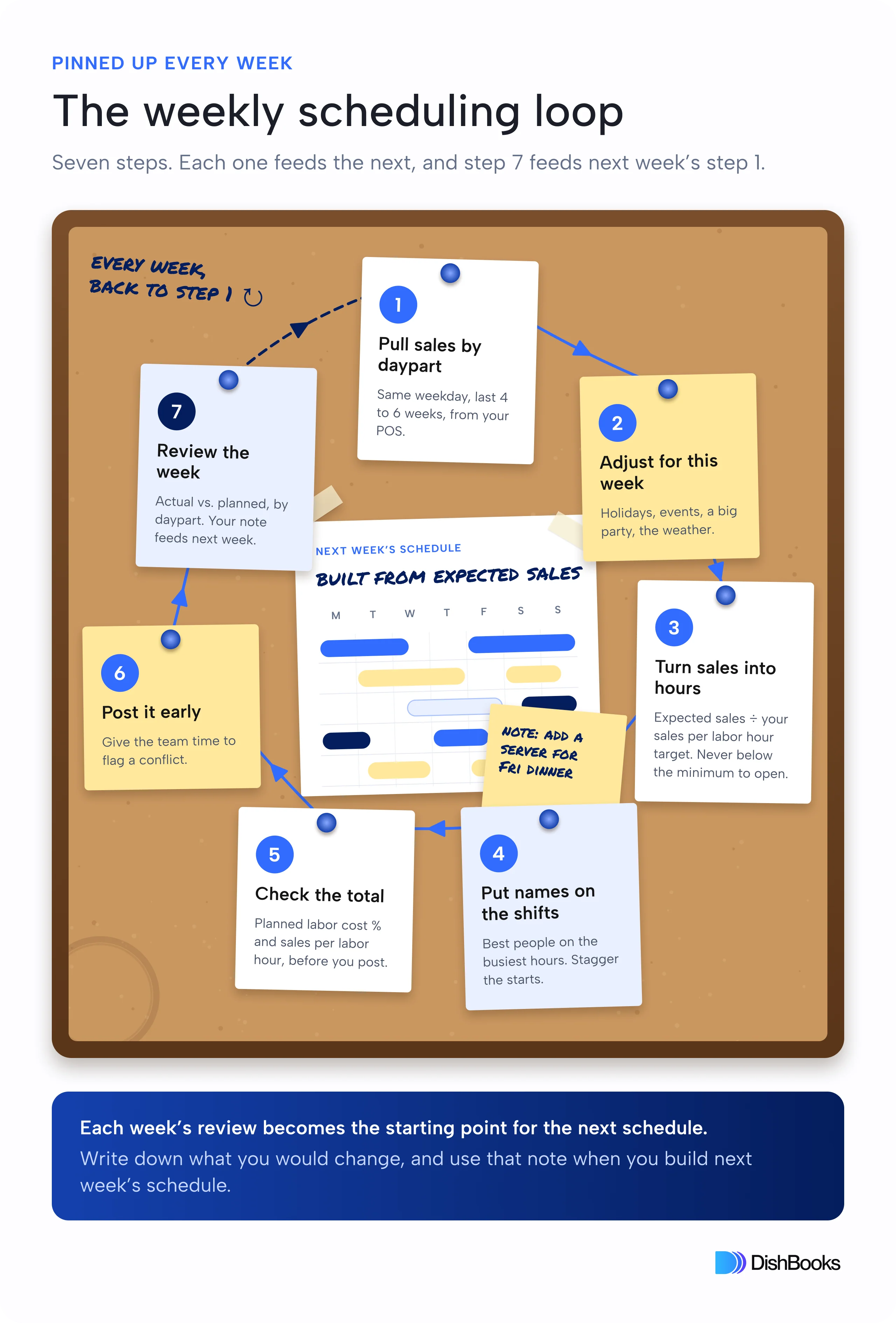
Even a good forecast meets real life. Three things break the plan most often, and each one has a move you can make before the week starts.
Someone will call out. Keep a short on-call list for each week, with people who agreed in advance to be reachable for a shift, so the backup plan isn't a round of text messages at 4 PM.
A quiet night will turn into a rush. Stagger start times so a later shift can come in earlier when it gets busy, and check sales against the forecast in the middle of the week. If Tuesday and Wednesday ran well above plan, adjust the weekend before it arrives.
Some shifts can't be cut once service starts. A server with four tables can't go home because the door slowed down, so plan the cuts in advance: a first cut and a second cut, by name and by time. When a daypart slows down, everyone already knows who goes first.
Labor and COGS are the two parts of prime cost, the costs an operator can influence the most. A schedule built from sales is how you move the labor half week by week, instead of finding out at month-end what it cost.
DishBooks is AI-powered accounting software for restaurants, and one part of it fits this guide directly: sales forecasting. DishBooks builds a sales forecast from your past results and shows it next to your actual sales, the same numbers you use to schedule your team and place your orders.
How far ahead should you post a restaurant staff schedule?
Far enough ahead that your team can plan around it and flag a conflict while there is still time to fix it. Pick one day and post on that day every week, so no one has to ask when the schedule is coming.
How do you schedule a new location with no sales history?
Borrow history from the closest match you have: a sister location with a similar menu and size, or the sales projections from your plan for the location. Staff to the minimum it takes to open the doors, build up from your best estimate, and review every few days instead of every week until you have four to six weeks of your own sales to work from.
What should you cut first when a shift slows down?
Start with the cut order you set before the week. The first cut usually goes to the position the slowdown reaches first, such as a server with no tables, and the people you need to close stay until the end.
